Bringing Traditional Streaming to visionOS: A Playback Pipeline for 3D, 180°, and 360° Video
How a client-side HLS server, APMP metadata, and MV-HEVC bring existing stereo and panoramic streams into Vision Pro’s native player.
Background
Traditional streaming platforms already host a substantial collection of stereoscopic videos packed side by side or over and under, along with 180° and 360° panoramic videos. Some of this material combines binocular disparity with panoramic projection, making it a natural fit for viewing in a headset. Yet playback pipelines designed for conventional screens often treat it as an ordinary rectangular image: the left and right views appear next to each other, and the panorama is laid out flat. Moving that same player onto Vision Pro does not automatically restore the depth and sense of space already present in the content.
Apple’s native media delivery system provides more explicit ways to describe this content. MV-HEVC carries the left and right views at the encoding layer, while the Apple Projected Media Profile (APMP) describes the geometry and view information of projected media such as 180° and 360° video. When delivering this content over HLS, the playlists must also declare the corresponding viewing layout and remain consistent with the media descriptions in the initialization segment. Together, the source pixels, encoding, and these declarations determine how the system presents the content. Apple Movie Profiles, Introduction to APMP
How It Works
One key part of this implementation is a local HLS server running inside the client. For stereoscopic panoramic content that needs conversion, the client retrieves video from the original CDN on demand, processes the two eye views, converts the encoding, and serves HLS playlists and media segments with the correct projection information through the local server.
The system player accesses this stream through 127.0.0.1, following the normal HLS process for playback, buffering, and seeking. Whenever the player requests a segment, the local server either returns a cached result or triggers generation of that segment. This lets conversion and playback proceed together while preserving the native Vision Pro playback experience.
Original CDN → On-device media adaptation → Local HLS server → Vision Pro system player
The HLS (HTTP Live Streaming) output from the local server follows Apple’s HLS Authoring Specification for Apple Devices. RFC 8216 documents the core HLS protocol, while newer capabilities such as stereoscopic and projection layouts also require an understanding of subsequent extensions. This article refers to Apple’s publicly available HTTP Live Streaming 2nd Edition draft. RFC 8216, HLS Authoring Specification for Apple Devices
In this pipeline, the three names represent three distinct responsibilities: HLS organizes transport and playlists, APMP defines the format requirements for projected media, and MV-HEVC carries the stereoscopic video encoding. Native delivery of stereoscopic APMP content requires all three layers to align. Apple Movie Profiles
HLS describes content through two levels of playlists. The Multivariant Playlist lists the available video variants, codec capabilities, and associated audio tracks. The Media Playlist lists the actual segments, their durations, and initialization information. The player first selects a suitable variant, then retrieves the corresponding resources according to media time.
The attribute most directly related to 3D, 180°, and 360° playback is REQ-VIDEO-LAYOUT. It appears in the Multivariant Playlist’s EXT-X-STREAM-INF tag and declares the presentation capabilities required by that video variant. Its value can combine two kinds of information:
| Dimension | Value | Meaning |
|---|---|---|
| Video views | CH-MONO | Monoscopic content: both eyes see the same view |
| Video views | CH-STEREO | Stereoscopic content: the left and right views must be presented separately |
| Projection | PROJ-RECT | Ordinary rectangular, planar presentation |
| Projection | PROJ-HEQU | Half-equirectangular, 180° projection |
| Projection | PROJ-EQUI | Equirectangular, 360° projection |
Here, CH describes the video views; audio channels are handled by the relevant audio-track declarations. The combinations are straightforward: CH-STEREO/PROJ-RECT describes planar 3D, CH-STEREO/PROJ-HEQU describes stereoscopic 180° video, and CH-STEREO/PROJ-EQUI describes stereoscopic 360° video. Replacing the stereoscopic value with CH-MONO gives the corresponding monoscopic panorama. Ordinary monoscopic planar video is the default case, so this attribute is usually omitted. These values declare presentation requirements; the specific geometry and view information must still be read from the media itself. HLS 2nd Edition Draft: REQ-VIDEO-LAYOUT
This also explains why EXT-X-VERSION:12 appears in the implementation: a playlist containing attributes with the REQ- prefix requires a protocol compatibility version of at least 12. This number expresses the playlist’s requirements for the client’s parsing capabilities. It is not a video format version, nor does it mean every Vision Pro video must use version 12. Each child playlist determines its own compatibility requirements from the tags it uses. Apple: About the EXT-X-VERSION Tag
Beyond spatial layout, the Multivariant Playlist must also provide the information the system needs to decode and select video variants:
| Tag or attribute | What it declares | Effect on playback |
|---|---|---|
EXT-X-STREAM-INF | A video variant and its attributes; the URI on the next line points to its Media Playlist | Establishes the playback entry point for a particular video variant |
CODECS | The video and audio codec types and their corresponding parameters | Lets the player determine decoding compatibility; it should match the actual bitstream |
SUPPLEMENTAL-CODECS | Supplemental codec information required by certain delivery configurations, such as particular Dolby Vision configurations | Provides additional information about enhancement layers or related codec capabilities |
RESOLUTION / FRAME-RATE | Video resolution and frame rate | Informs display behavior and variant selection |
BANDWIDTH / AVERAGE-BANDWIDTH | Peak and average bandwidth requirements | Helps the player select among variants according to network conditions; these values do not directly set the encoder’s bitrate |
VIDEO-RANGE | A dynamic-range category such as SDR, HLG, or PQ | Describes the video’s transfer characteristics; this is independent of the number of views and projection coverage |
EXT-X-MEDIA and AUDIO | Defines audio groups and associates video variants with them | Organizes playback resources with separate audio and video |
Apple’s official HLS example appendixes illustrate how these attributes work together. For example, VIDEO-RANGE=PQ does not, by itself, prove that the content uses Dolby Vision, nor does it indicate that the video is stereoscopic or panoramic.
In the Media Playlist, the declarations shift their focus to the timeline, initialization information, and segment boundaries:
| Tag | What it declares |
|---|---|
EXT-X-MAP | The initialization segment used by the current segments. For fMP4, this includes decoder configuration, track descriptions, and the corresponding stereoscopic and projection metadata |
EXTINF | The duration of the next media segment, in seconds |
EXT-X-TARGETDURATION | The segment duration limit for the playlist; each segment’s EXTINF, rounded to the nearest integer second, must not exceed this value |
EXT-X-BYTERANGE | A segment’s byte length and offset within a resource, allowing a large file to be read by range as multiple logical segments |
EXT-X-MEDIA-SEQUENCE | The sequence number of the first media segment in the playlist, identifying segment order |
EXT-X-DISCONTINUITY | A discontinuity in the timestamp sequence, format, or other properties of the following segments, signaling that the player must reestablish the relevant interpretation state |
EXT-X-INDEPENDENT-SEGMENTS | Declares that segments can be decoded without relying on media samples from other segments; initialization information is still required |
EXT-X-PLAYLIST-TYPE:VOD | Declares a video-on-demand playlist whose content is fixed |
EXT-X-ENDLIST | Declares that no further media segments will be added to the playlist |
These tags form the foundation of segmented playback and random seeking. RFC 8216: Playlists and Media Segments
Spatial playback ultimately depends on consistency across the entire chain of declarations. When the Multivariant Playlist declares CH-STEREO/PROJ-HEQU, the initialization segment must contain matching stereoscopic and half-equirectangular projection descriptions, and the actual video must supply two eye views that meet the delivery requirements. MP4 structures such as vexu, eyes, and proj carry these media semantics. They are container metadata, introduced into the playback pipeline through the initialization segment referenced by EXT-X-MAP. Introduction to APMP
Client-side adaptation therefore has to solve three problems together: arrange the source imagery into the correct eye views or projected content, encode and package it in the target delivery format, and generate HLS declarations that match the media. The system uses this information to identify the available capabilities and offer the appropriate viewing experience.
Implementation Approach
These existing videos already contain the necessary stereoscopic or panoramic information. Through media adaptation, the client can bring them into Vision Pro’s native playback system. That was the starting point for this work: reuse the existing video resources and distribution infrastructure, add projection descriptions on the device, reorganize media delivery, and process the two eye views and convert the encoding where necessary. The goal was to turn the spatial information lying dormant inside rectangular images into stereoscopic and immersive experiences that people could watch directly.
With that approach, I added a new set of playback capabilities to a traditional streaming client. Side-by-side videos can be viewed stereoscopically, 180° content can unfold into a hemisphere in front of the viewer, 360° content can surround them, and stereoscopy and panoramic projection can be combined freely.
All of these experiences use the same system player, retaining play, pause, seeking, quality selection, and information panels. They appear as just a few options in the interface, but behind those options are CDN addressing, segment indexing, media packaging, stereo composition, video encoding, and system presentation.
The central task was to make a pipeline originally responsible only for transporting rectangular images capable of expressing a video’s full spatial meaning.
I began by separating “how many eye views” from “where the image is placed” into two independent dimensions.
The view layout determines what the left and right eyes each receive. The projection determines whether the pixels belong on a plane, a hemisphere, or a complete sphere. Common viewing experiences can then be expressed directly as a matrix:
| View layout | Planar | 180° | 360° |
|---|---|---|---|
| Monoscopic | Ordinary 2D video | Monoscopic hemispherical video | Monoscopic panoramic video |
| Stereoscopic | Planar 3D video | Stereoscopic 180° video | Stereoscopic 360° video |
Side-by-Side, or SBS, and Over-Under are ways of packing the two eye views into an image. MV-HEVC, or Multiview HEVC, carries multiple views at the encoding layer. These answer a different question from “180° or 360°?”
The player also needs to track the media’s stage in the pipeline: is it source material to be processed, or delivery-ready content that already meets the system’s requirements? Even for the same “stereoscopic 180°” experience, an SBS source file and a delivery-ready MV-HEVC file need different processing paths. Apple’s Apple Projected Media Profile (APMP) also explicitly distinguishes production from delivery. Stereoscopic APMP delivery uses MV-HEVC; frame packing used during production cannot simply be treated as the delivery format. Apple Movie Profiles
This model gave the rest of the work a stable foundation. Changing quality changes the video variant, while changing the CDN changes the access path. Both should preserve the eye-view layout and projection semantics.
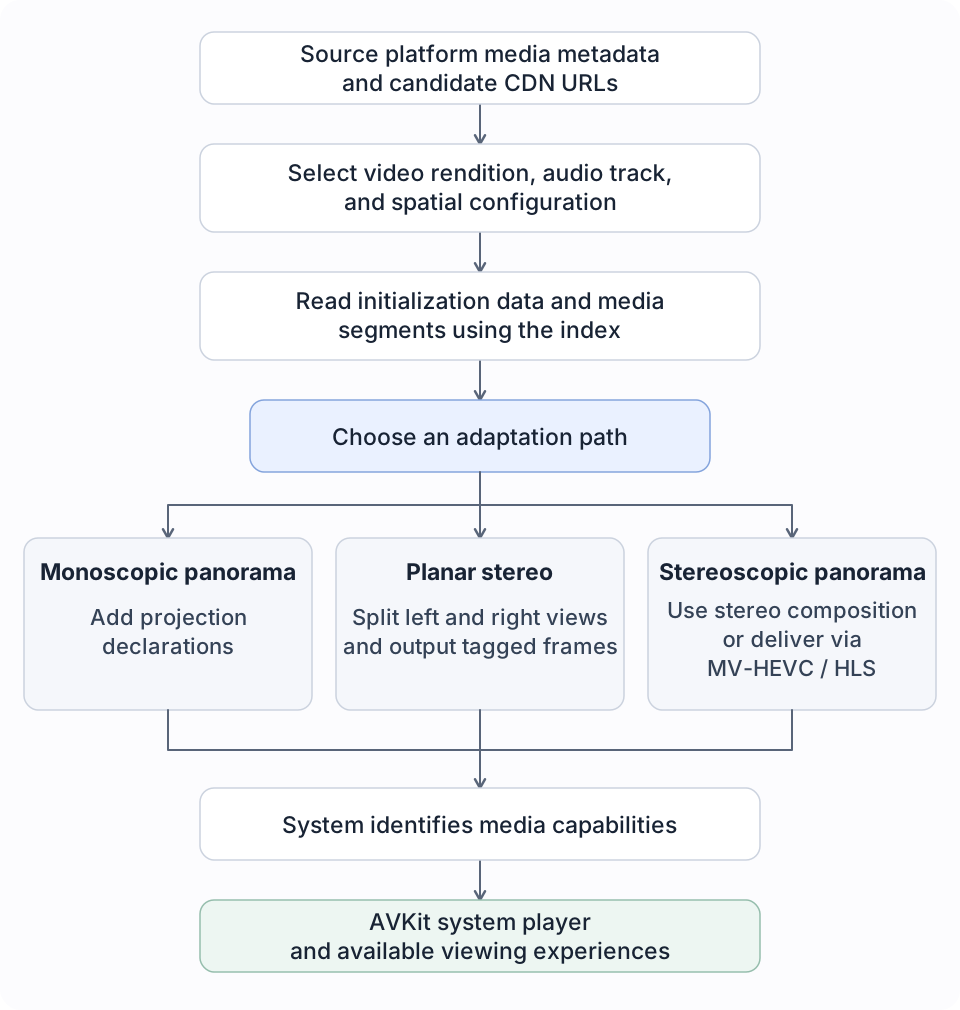
At a high level, the pipeline looks like this:
Open the full-size pipeline diagram
Before moving into rendering, I first addressed where the video would come from and how to read it on demand.
A traditional streaming source does not necessarily deliver a complete MP4 file. Audio and video are often separate, the same content may have multiple quality levels, codecs, and CDN URLs, and the media data is described through initialization ranges and segment indexes.
Getting a URL was therefore only the beginning. I organized the primary and backup URLs into a set of candidates, assigned priorities according to node type—for example, lowering the priority of some PCDN nodes—and tried other candidates when a request failed. Selection expanded from “whichever URL comes first” to account for node characteristics and actual read results.
Beyond URL selection, HTTP Range behavior was even more important. When the viewer seeks to a particular time, the lower layers need to translate that time into byte ranges in the source file and retrieve only the data required for decoding. The segment index, sidx, provides that bridge: it connects media time, segment length, and position within the source object.
One easily overlooked detail is the index’s coordinate system. After an index is downloaded separately, its position in memory starts at zero, but its byte position in the source file has not changed. The parser must preserve that relationship. Otherwise, an offset may look reasonable while pointing the request at the wrong data.
At this layer, I also retained a choice that might seem conservative: separate Range requests with controlled concurrency for critical metadata. Combining multiple ranges could reduce the request count, but some CDNs respond to multi-range requests by returning the entire object. A small metadata probe then becomes a large file download. The implementation checks both the response status and the returned length for segment reads and switches away from failing candidates.
There is also a firm boundary on switching backup URLs. Once a downstream response has begun emitting media bytes, it cannot freely continue with a response from another CDN. Otherwise, the network layer may report a “successful retry” while the player receives a corrupted splice of data. This constraint directly affects the reliability of the first frame, seeking, and failure recovery.
To support processing paths that need file-style random access, I also built a virtual MP4 layer. It assembles the file headers and sample tables locally, then maps reads within the virtual file back to the remote audio and video objects. The original media data stays on the CDN, and the client retrieves it only as needed.
This turns separate remote media resources into a unified asset view for the upper layers, without requiring the entire video to be downloaded before processing can begin.
Using the protocol descriptions above, I could reorganize the initialization information and sidx indexes of the source DASH resources into HLS. EXT-X-MAP references the initialization segment, EXTINF expresses the time slices, and EXT-X-BYTERANGE expresses their positions in the original CDN objects. This basic transport path generates another description of how to access the same media data, allowing the original compressed segments to be reused.
For monoscopic 180° and 360° content, adaptation centers on projection semantics.
A panoramic video is still stored as a rectangular image; what changes is the meaning of its pixels. A 360° equirectangular image uses the horizontal axis for longitude and the vertical axis for latitude. A 180° half-equirectangular image covers the forward hemisphere. The system needs to know this mapping to reconstruct the correct viewing space. WWDC25: Explore Video Experiences for visionOS
For sources whose pixels already match the target projection, and whose encoding and packaging meet the processing requirements, I can retain the compressed media data, add the APMP projection declarations to the initialization information, and generate a matching HLS description. The main costs of this path are container processing and network reads.
In MP4, the relevant information is carried by Video Extended Usage, or vexu. proj/prji describes the projection type, eyes/stri describes stereoscopic view information, and pack/pkin in production material describes how the two eye views are packed. They answer separate questions about geometry, views, and storage layout; they cannot substitute for one another. Stereo Video ISOBMFF Extensions
After writing the declarations, I still need to check whether the system actually recognizes the non-planar projection. The monoscopic panorama path queries capability information through AVAssetPlaybackAssistant and retains explicit fallback behavior if recognition fails.
This strategy has a specific boundary: panoramic material that has already been unwrapped can be given the correct spatial description, but other projections, such as dual-fisheye imagery, still require the appropriate geometric transformation.
For side-by-side 3D, the work reaches into every frame.
When an ordinary decoder reads an SBS video, it produces a frame containing both images. To let the system use it as stereoscopic content, the two views must be separated according to the actual packing layout, retain the same presentation time, and be explicitly labeled as belonging to the left or right eye.
The planar stereo path does this with a custom video compositor and outputs the two eye views through Core Media’s tagged buffers. The tags carry media type, eye assignment, and projection semantics, giving the composition result a structure the system can understand. AVAsynchronousVideoCompositionRequest
Aspect ratio, crop direction, and output dimensions must be handled together as well. SBS affects the effective width of each eye view, while Over-Under affects its effective height. Treating the dimensions of the packed image as the dimensions of a single eye view can produce squashed scenery. Reversing the eye order also changes the perceived depth relationships.
Color information must travel through the pipeline too. The decoded frame’s YCbCr matrix, color primaries, and transfer function need to be inherited correctly by the compositor’s output. Even when the eye views are separated correctly, losing the color descriptions can still produce color shifts or incorrect brightness relationships. Spatial adaptation has to preserve geometry, timing, and color together.
This path can distribute the eye views during playback, avoiding the wait to generate a complete stereoscopic file in advance. Its output, however, consists of runtime eye-view frames. That is a different level of capability from producing an MV-HEVC video that conforms to the delivery specification.
For stereoscopic panoramic video, I took adaptation one step further into encoding and delivery.
For stereoscopic panoramic streams that need their delivery reorganized, I added a path that converts them to MV-HEVC on demand, then packages them as APMP fMP4/HLS. The specific route depends on how the source is supplied. File-style inputs can continue to use stereo composition with projection tags. For projected stereoscopic content delivered as separate streams, the pipeline first attempts conversion to native delivery and retains the compositor path for compatibility. Apple’s official conversion sample likewise demonstrates the complete relationship between source layout, projection descriptions, and the delivery format. Converting Projected Video to Apple Projected Media Profile
I organized this work as a segmented pipeline centered on the playback position. It first locates the required remote audio and video segments and prepares them as readable input. After decoding, it separates the left and right views and passes them to VideoToolbox for encoding. The packaging layer then outputs initialization and media segments. The system player reads these HLS resources through a local loopback HTTP server.
This allows the complete video to retain a full timeline index while conversion happens only as segments are needed. Seeking changes the priority of the region to be processed, and obsolete tasks can be canceled once playback moves elsewhere. Generated segments enter a bounded cache, while neighboring segments are prefetched in moderation.
The scheduling goal is to coordinate network reads, decoding, encoding, and playback buffering around the same region of time. Producing the first frame requires a playable region as soon as possible. Continuous playback requires enough processing throughput, while seeking demands that work shift quickly to a new position. Resolution, frame rate, network conditions, and device load all shape the tradeoffs among these goals.
Segmented conversion also introduces several boundaries that need careful handling. Source segment boundaries may not align with target segment boundaries, so trimming must use timestamps. Independently encoded regions need correct initialization and discontinuity declarations. Audio must enter the output on the same timeline. If generating a target segment fails, the failure should be surfaced and a retry allowed. Filling the gap with the previous segment instead would make the player repeat the same short passage.
This path includes re-encoding. Preserving the source resolution therefore describes a sizing strategy; image quality, color, and audio each have their own processing constraints and must be evaluated for the specific encoding path.
The final layer is handing the media capabilities reliably to the system player.
I kept AVPlayer and AVPlayerViewController at the center of playback and interaction, with AVKit managing the available viewing experiences. This lets spatial playback fit into the existing pause, seek, quality-selection, and panel logic. Playing Immersive Media with AVKit
At this layer, three states must remain distinct: which experiences the app permits, which experiences the system determines the current media can provide, and which experience the user has actually entered. Allowing an immersive experience in configuration means only that the app is willing to offer it. Confirming success also requires evidence from media recognition and the actual experience state.
Mode switching is therefore handled as a transaction. The new media configuration is prepared in the background. Only after preparation succeeds does the player replacement take effect, restoring the current position and playback intent. If preparation fails, the old content remains in place. If the user requests several switches in succession, results from obsolete tasks must not override the most recent selection.
The same mechanism covers quality changes and transport fallbacks. A network failure may change the read path, but it must not silently turn “stereoscopic 180°” into content with different media semantics. When a downgrade really is necessary, the actual playback state and the selection shown in the interface must stay synchronized.
The validation records I built for this pipeline inspect HLS declarations, container metadata, framework recognition, compositor output, and the final viewing experience along the way. Structural tests establish whether information is passed consistently. Visual checks on the device verify geometry, eye order, seams, the first frame, and switching behavior. These two forms of evidence serve different purposes.
The scope of this article is the adaptation of planar stereoscopic video and combinations of 180° and 360° projected content. Apple’s branded Apple Immersive Video has its own format and production system. Bringing ordinary stereoscopic panoramic content into APMP does not automatically make it Apple Immersive Video. Apple Immersive Video
What I found most rewarding about this work was bringing constraints previously scattered across networking, containers, encoding, and rendering into one coordinated playback pipeline. When the user changes a viewing option, the source reads, frame organization, and the system’s understanding of the content all change with it.
The video still comes from the same streaming infrastructure, but the space in which we watch it opens up.
The Longer Journey
In reality, this project stretched over a very long period, and the process was far from smooth.
The idea of building this kind of video app first came to me in early 2024, when I experienced spatial video, 3D video, and immersive video for the first time.
My own ideas gradually took shape, and Apple’s APIs continued to develop. By the time visionOS 26 arrived, the APIs I needed to play traditional stereoscopic video with AVPlayerViewController were in place.
At the same time, something even more significant was happening: AI. I kept trying to solve this problem with early versions of ChatGPT and Claude, and my approach had already become fairly mature.
Then, one day not long after GPT 5.6 was released, I decided it was time to finish this project properly.
I have to acknowledge that, in my experience on this project, GPT 5.6 handled more than 80% of the coding and the exploration of implementation details.
It is hard to imagine how much time I would have spent if I had still needed to write all the code by hand to debug HLS tags and attributes, or to split and align video segments manually.
References
- Explore video experiences for visionOS · WWDC25
- Learn about the Apple Projected Media Profile · WWDC25
- Apple Movie Profiles
- Stereo Video ISOBMFF Extensions
- RFC 8216: HTTP Live Streaming
- About the EXT-X-VERSION tag
- HLS Authoring Specification for Apple Devices
- HLS Authoring Specification Appendixes
- HTTP Live Streaming Protocol Draft
- Converting projected video to Apple Projected Media Profile
- Playing immersive media with AVKit
- Support immersive video playback in visionOS apps · WWDC25
This article focuses on the architecture and principles of the implemented pipeline. The discussion of APMP and the associated system playback capabilities is set in the context of visionOS 26 and later.
评论与交流
欢迎讨论。使用 GitHub 账号参与,评论公开保存在这个博客的 Discussions 中。在 GitHub 打开